The DM Tools are intended to make it easier for DMs to run games on the server - from setting up your initial game listing, to calculating your DM incentives, to logging your session log and MAL record. They are not mandatory to use, but once you get used to it, should make it much faster to run games as a DM on this server.
We have 2 versions of the DM Tools: a Google Sheet version, and a web application version - which has more built-in support for new DMs. See the links below:
| Tool Version | Description | Access |
|---|---|---|
| Google Sheet (v5) | The original DM Tool developed in Google Sheets. Tried and tested for hundreds of games. ( details ) | Open Google Sheet |
| Web Application | Modern version built into the site with templates, multi-session support, and player input pages. ( details ) | Launch Web Tool |
The DM Tool is a Google Sheet tool that is intended to make it easier for DMs to run games on the server - from setting up your initial game listing, to calculating your DM incentives, to logging your session log and MAL record. It is not mandatory to use, but once you get used to it, should make it much faster to run games as a DM on this server.
Removed all extra spaces and rows in the session logs. Now the session log automatically adjusts the rows based on # of players, and no more extra invisible tabs and spaces to delete!
Multi-session auto-tab feature (auto-hide tabs based on # of hours): this requires activation of a script to work, activation of a script is completely optional (you need to click on a button to “install” the script). If you don’t want to do it, I include instructions on how to manually unhide tabs.
Additional in-cell notes/help text: instructions appear as you click on each cell
Loot Tool: Rolled loot command auto-generated for copy and pasting. A revised pre-determined loot tab to plan pre-determined loot, with auto-generated declaration (complete with spoiler tags) to be copied into #treasure-log
Added Player Notes for addition notes for players (e.g. spell casted, lasting conditions, etc.)
The DM tool can handle up to 5-part multi-sessions (up to 20.5 hours of gameplay) with a different tab for each session (labled Part 1, Part 2, Part 3), etc.
To make it less intimidating for new DMs, Parts 2-5 are hidden by default. If you do run a multi-session game, there are 2 options:
Click on the [Enable Multi-session] button. This activates a script that only needs to be run once, but the script will auto-hide and un-hide tabs based on number of hours.
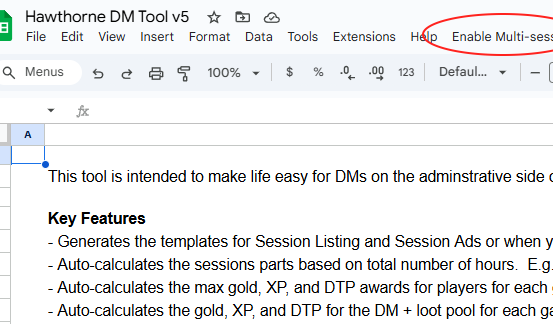
But it will popup a google alert asking you to authorise the script that is potentially unsafe. This is a standard alert for any google scripts. All the script does is hide and unhide tabs. It does not do anything else or nefarious. If you are okay with trusting this, authorise the script for by clicking on Advanced and enable “Sheet Hider” script.
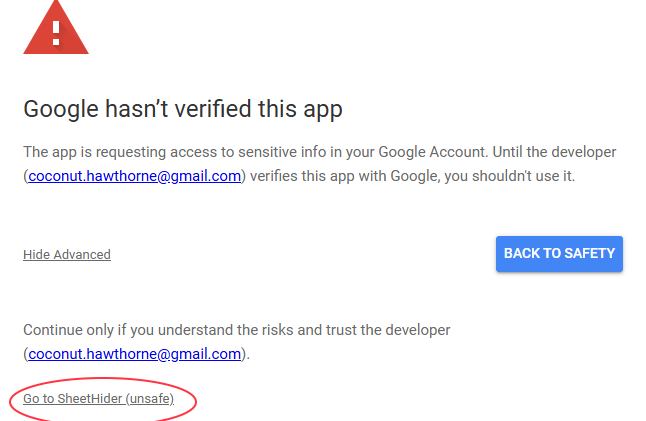
If you choose to enable the multi-session script, a warning will pop-up. Yes the warning sounds scary… But it’s just a script that hides, and unhides tabs. If you trust it, click on [Advanced] then [Go to SheetHider] to enable the script…
Then allow it to have access to hide/unhide tabs. Check select all and proceed.
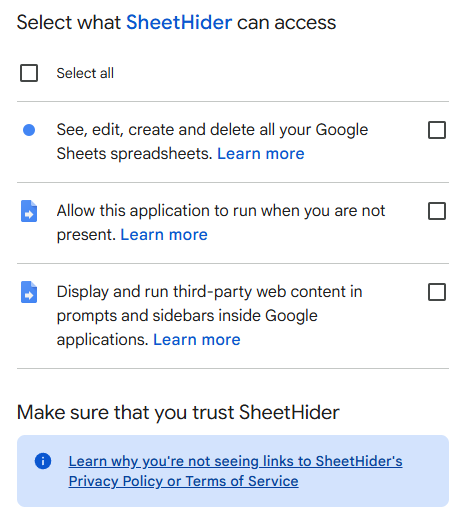
Note that it asks you for these access because it’s what’s in the “access package” of a google script, but again all it does is auto-hide and unhide tabs. It will not create or delete google sheets, etc. or anything nefarious. You can check the code by going to the [Extensions] menu -> [App Scripts].
It will tell you the script is installed and the “parts” tabs will hide and unhide depending on the # of hours.
Once this is done, you should not need to install the script again for future games. The script will remain installed in your google account.
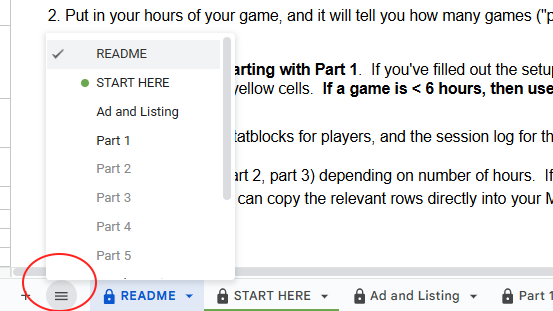
If you don’t feel comfortable authorising the script (perfectly understandable!), you can unhide the tab using the hamburger menu (icon: 3 horizontal lines) at the bottom left of the gsheet (circled) which shows all tabs, and you can manually unhide Part 2, Part 3, etc. as needed.
This is a new version of the tool re-built from the ground up, with more powerful features and more built-in help for new DMs. Key features include:
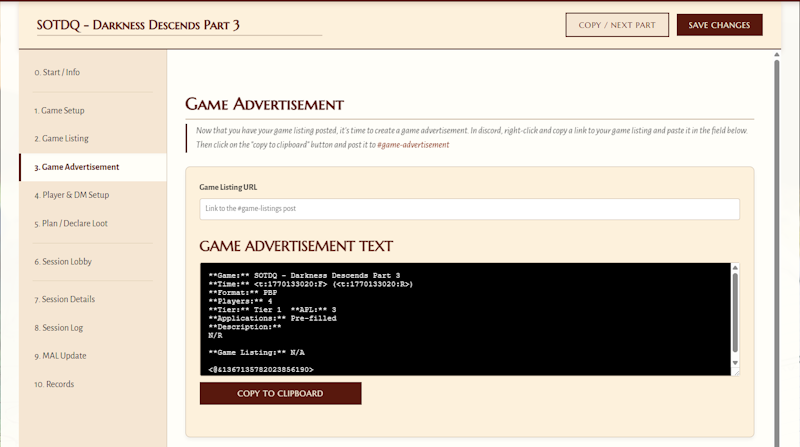
You can find the all new DM Tool here: Launch Web DM Tool
 Hawthorne Guild